PDF Accessibility Simplified
Edlio Accessible Documents improves PDF accessibility in multiple ways, creating HTML versions of each document while also providing tools to remediate the original PDF.
As schools and districts work to improve digital accessibility ahead of upcoming ADA Title II deadlines, PDFs have posed a particular challenge, as they are not easily remediated, and there are often large numbers of them on school or district sites. Edlio Accessible Documents addresses both of these issues, and was built to align directly with WCAG, PDF/UA, and ADA Title II, supporting schools in their accessibility and compliance efforts.
HTML Conversion
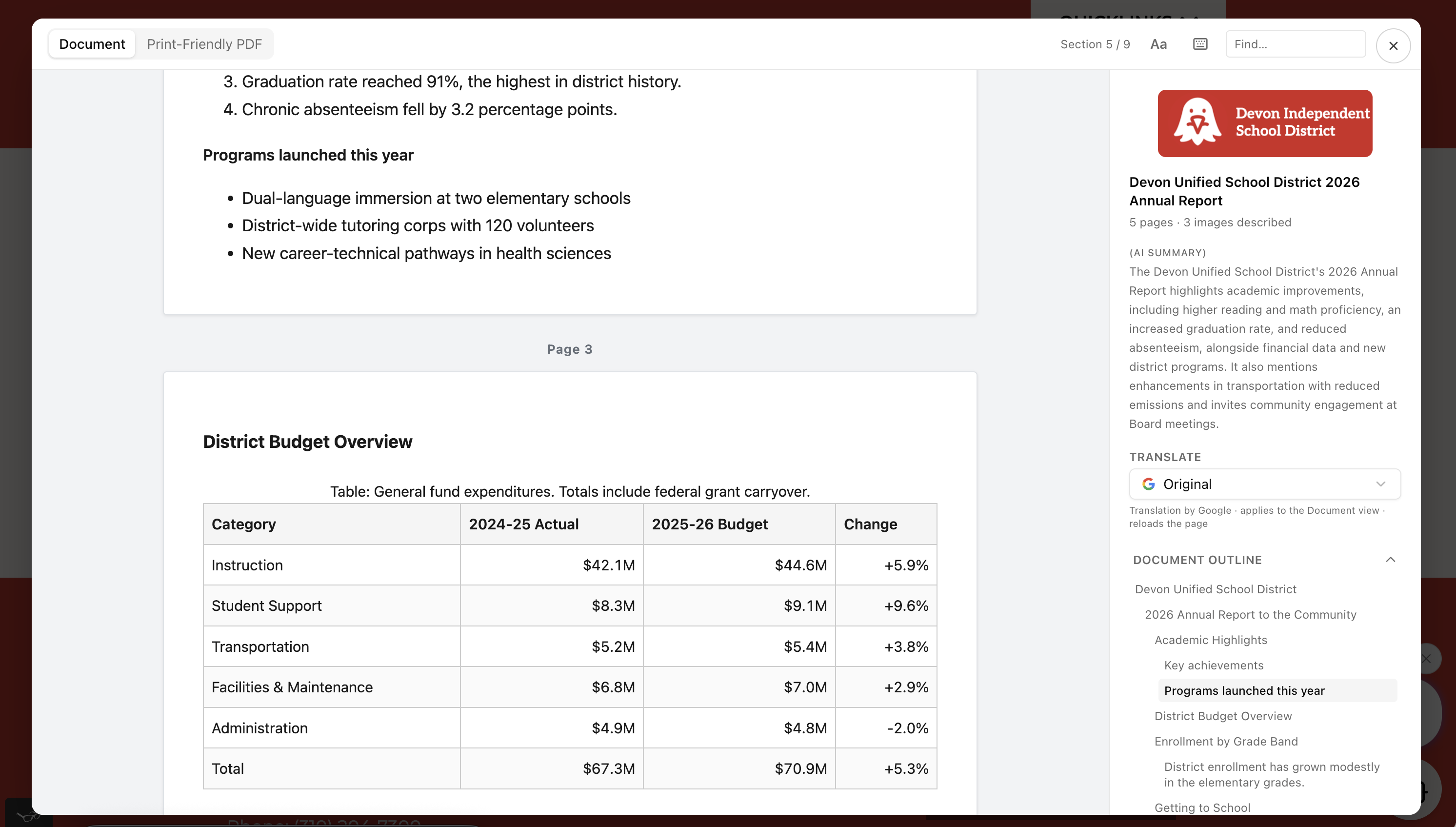

Instant HTML Conversion:
Every PDF on the school site is automatically converted to an HTML version that becomes the primary document all users see, while the original PDF serves as a print-friendly version. The HTML version is screen reader-friendly, has a customizable view, and features multilingual support.
HTML Document Chat:
HTML versions feature an AI chat interface that summarizes content and allows readers to ask questions within the document.
HTML to PDF Form Fill:
For PDFs with fillable fields, users can complete the form in the HTML version, and information will be transferred to the original PDF.
Native to Edlio CMS:
Accessible Documents provides a seamless experience for Edlio CMS users: both HTML conversion and PDF remediation can be accessed from the same dashboard as other platform features.
Remediate Original PDF Documents
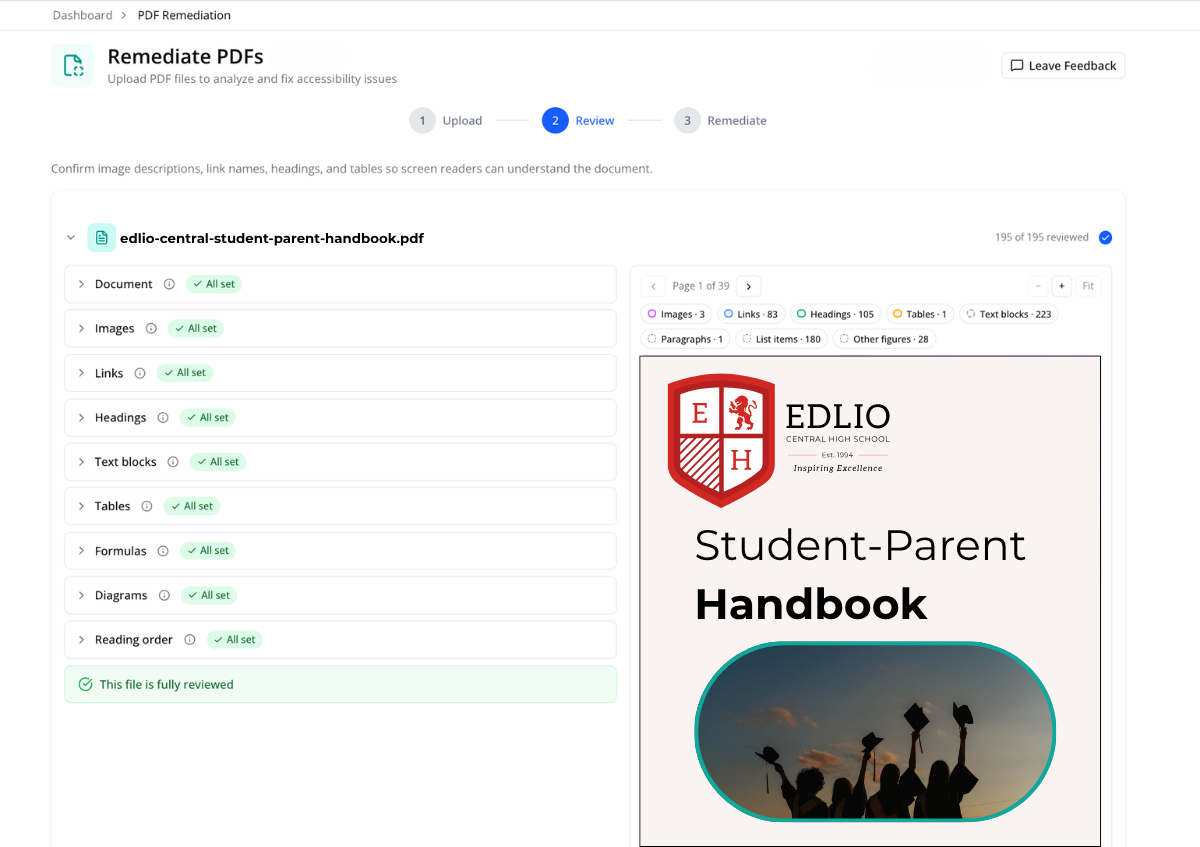
PDF Scanning:
Original PDFs are scanned according to WCAG 2.2 and PDF/UA (PDF/Universal Accessibility).
AI-Powered Remediation:
Common issues are fixed automatically. AI drafts a title, subject, keywords and document language, all of which are editable.
Additional Guidance:
Anything needing additional attention is clearly explained with step-by-step instructions for manual fixes.
Native to Edlio CMS | Available as Standalone
One product, two ways to turn it on.
Accessible Documents lives right on your dashboard.
You can enable and manage Accessible Documents right alongside the other tools in your CMS, so everything feels familiar.
Easily add Accessible Documents to your website.
Accessible Documents works on any school or district website, simply add the code to your existing site.

“Accessible Documents is the next step in our ongoing commitment to digital accessibility. The foundation of that commitment is designing accessible websites for schools. In 2025, we built on that foundation by launching Edlio Accessibility to give schools the ability to scan and fix issues with site content in one click. Now with Accessible Documents, we are addressing PDFs, so schools can make both their website and the documents that live on it more accessible to everyone.”
Ali Arsan
Founder & CEO, Edlio
FAQ
What is Edlio Accessible Documents?
Edlio Accessible Documents improves PDF accessibility in multiple ways, creating HTML versions of each document while also providing tools to remediate the original PDF. It was built to align directly with WCAG, PDF/UA, and ADA Title II, supporting schools in their accessibility and compliance efforts.
How does HTML conversion work?
Every PDF on the school site is automatically converted to an HTML version that becomes the primary document all users see, while the original PDF serves as a print-friendly version. The HTML version is screen reader-friendly, has a customizable view, and features multilingual support.
What can readers do inside the HTML version?
HTML versions feature an AI chat interface that summarizes content and allows readers to ask questions within the document. For PDFs with fillable fields, users can complete the form in the HTML version, and information will be transferred to the original PDF.
How are the original PDFs remediated?
Original PDFs are scanned according to WCAG 2.2 and PDF/UA (PDF/Universal Accessibility). Common issues are fixed automatically, and AI drafts a title, subject, keywords and document language, all of which are editable.
What happens to issues that cannot be fixed automatically?
Anything needing additional attention is clearly explained with step-by-step instructions for manual fixes.